Every Sunday, churches across the world welcome visitors who are taking a brave step — walking into an unfamiliar building, sitting among strangers, and hoping to find a community that feels like home. That first visit is a critical moment. What happens in the days that follow often determines whether that visitor comes back or quietly disappears.
Research consistently shows that the window for meaningful follow-up is narrow. If a church does not reach out within the first 48 hours after a visit, the chances of that person returning drop significantly. Yet many churches struggle with exactly this: collecting visitor information reliably and following up consistently.
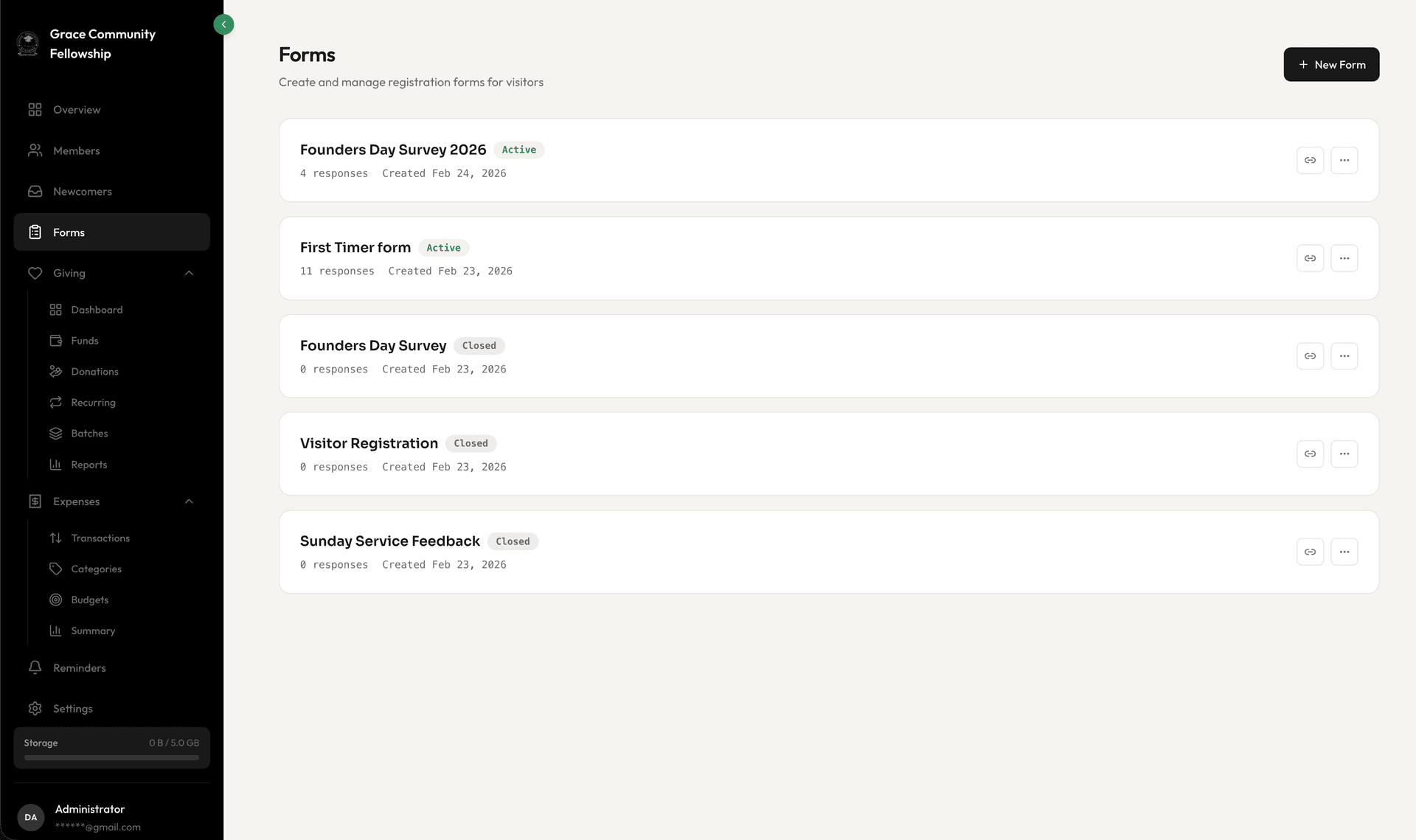
Fellowr's forms and visitor engagement tools are built to close that gap. In this guide, we will cover how to create custom forms, capture visitor information seamlessly, manage your newcomer pipeline, and use surveys to keep your finger on the pulse of your congregation.
Why Visitor Follow-Up Matters
Most churches lose the majority of their first-time visitors. Not because the service was bad or the people were unfriendly, but because no one followed up. The visitor filled out a card that sat in a stack on someone's desk. Or they did not fill out a card at all because the process felt intrusive.
Effective follow-up is not about being pushy. It is about communicating that someone was noticed, that their presence mattered, and that there is a place for them if they want it. A well-timed email, a personal phone call, or an invitation to coffee can make all the difference.
But follow-up requires information, and information requires a frictionless way to collect it. That is where forms come in.
Building Custom Forms
Fellowr's form builder lets you create forms for any purpose — visitor registration, event sign-ups, volunteer applications, prayer requests, or feedback surveys. The drag-and-drop interface makes it easy to design forms without any technical knowledge.
Form Fields and Types
You have access to a range of field types to capture exactly the information you need:
- Text fields for names, addresses, and open-ended responses
- Email and phone fields with built-in validation
- Dropdown menus for structured choices like "How did you hear about us?"
- Checkboxes for multiple selections like ministry interests
- Date pickers for birthdays or event dates
- Long text areas for prayer requests or detailed feedback
Conditional Logic
Not every question is relevant to every respondent. Conditional logic lets you show or hide fields based on previous answers. If someone indicates they are a first-time visitor, you might show additional questions about how they found your church. If they are a returning member, you skip straight to the relevant section.
Branding and Customization
Your forms should feel like an extension of your church, not a generic survey tool. Customize colors, add your church logo, and write welcoming copy that reflects your community's personality. A warm, well-designed form signals that you care about the details — and that sets the tone for the visitor's entire experience.
QR Code Registration
Paper visitor cards are fading. Many visitors — especially younger ones — prefer to use their phones. Fellowr generates a unique QR code for each form that you can display on screen during services, print on bulletins, or place on table cards in the lobby.
Visitors scan the code with their phone camera, fill out the form on their device, and submit it without ever needing a pen. The information flows directly into Fellowr in real time, so your follow-up team can start reaching out before the visitor even gets home.
Best Practices for QR Codes
- Display prominently. Put the QR code on the main screen during welcome time, not buried in the back of a bulletin.
- Explain what it does. A simple line like "New here? Scan to connect with us" removes uncertainty.
- Test the code. Before each service, scan it yourself to make sure it loads correctly.
- Keep the form short. For a visitor card, ask only for name, email, phone, and one or two optional questions. You can learn more over time.
The Newcomer Inbox
Collecting visitor information is only half the equation. The other half is acting on it. Fellowr's newcomer inbox is a dedicated space where every new form submission lands, organized and ready for follow-up.
How It Works
When someone submits a visitor form, their response appears in the newcomer inbox. Your follow-up team can see at a glance who is new, when they visited, and what information they shared. Each entry has a status — new, contacted, follow-up scheduled, or connected — so your team can track progress without anything slipping through the cracks.
Assigning Follow-Up
You can assign each newcomer to a specific team member for follow-up. Maybe your pastor handles first-time visitors personally, while a hospitality team member handles returning guests. Assignments ensure accountability and prevent the common problem of everyone assuming someone else will follow up.
Moving to Membership
When a visitor transitions from newcomer to regular attender to member, Fellowr makes it easy to move them through that journey. With a few clicks, a newcomer's information can be promoted to a full member profile, carrying over all the data you have already collected. No re-entry needed.
Event Sign-Ups
Forms are not just for visitors. They are equally valuable for managing events — retreats, conferences, volunteer training, small group launches, and more.
Registration Forms
Create a registration form for any event with fields tailored to what you need: attendee name, number of guests, dietary restrictions, t-shirt size, or payment confirmation. Share the form link via email, social media, or your church website.
Capacity Management
Set a maximum number of registrations and Fellowr will automatically close the form when you reach capacity. This prevents over-registration and gives you an accurate headcount for planning.
Attendee Lists
Pull a list of everyone registered for an event at any time. Export it for name badges, catering orders, or check-in sheets. After the event, the registration data stays in Fellowr as a historical record.
Feedback Surveys
Healthy churches listen to their people. Surveys give your congregation a voice and provide leadership with honest feedback that drives improvement.
Post-Event Surveys
After a major event — a conference, a sermon series, or a community outreach — send a short survey to participants. Ask what went well, what could improve, and what they would like to see next. Keep it brief: five to seven questions is the sweet spot.
Congregation Pulse Checks
Periodic pulse surveys help you understand how your congregation is feeling about the direction of the church, the quality of ministries, and areas of unmet need. These do not need to be long or formal. Even a three-question survey sent quarterly provides valuable data over time.
Response Analytics
Fellowr collects and summarizes survey responses so you can see patterns at a glance. View response counts, average ratings, and open-ended feedback all in one place. When you spot a recurring theme — whether positive or negative — you have the information you need to act on it.
Turning Data into Relationships
Forms and surveys are tools, but the goal is always relational. Every form submission represents a person reaching out to your church. Every survey response is someone sharing what they honestly think.
The churches that do this well are the ones that treat data collection not as an administrative task but as the beginning of a conversation. When a visitor fills out a card, that is their way of saying, "I am interested." The form just makes it possible for you to say, "We are glad you are here," and actually mean it with a follow-up action.
Fellowr gives you the infrastructure to capture these moments and turn them into lasting connections. The rest — the warmth, the intentionality, the genuine care — that is what your church already does best.
Ready to get started?
Free forever, for a church of any size. Paid plans include a 14-day free trial.
Start Free Today